How to Do an SEO Audit That Gets You More Customers
Most SEO audits are a complete waste of time and money.
There, I said it. They’re usually one of two things: a 100-page PDF automatically generated by some software, filled with cryptic charts and terrifying red warnings. Or they’re a theatrical presentation by an agency designed to justify their retainer by overwhelming you with jargon.
Both lead to the same place: “Audit Overwhelm.” You’re left with a list of 200 “errors” and no idea where to start. So you do nothing.
Let’s fix that. This isn’t about chasing a perfect score on a tool. This is a “Triage Audit.” It’s a ruthless, practical guide for entrepreneurs and small business owners to find the 3-5 critical blockages actively stopping you from getting more customers through search.
We’re going to focus only on what actually moves the needle.
- Most audits overwhelm with noise; perform a focused "Triage Audit" targeting 3–5 critical issues that actually drive customers.
- Start with free essentials: Google Search Console, GA4, and PageSpeed Insights for actionable data, not vanity metrics.
- Technical checks first: ensure indexability, mobile-first friendliness, HTTPS, and acceptable Core Web Vitals (fix noindex, slow pages, broken links).
- On-page clarity: each page should have one clear keyword intent, matching searcher intent, with descriptive titles and H1s.
- Prioritise fixes using an Effort vs Impact matrix; repeat triage audits every three months and outsource high-effort tasks when needed.
First, Assemble Your No-Nonsense Toolkit
You don’t need a dozen expensive subscriptions. You just need a few reliable sources of data. Remember the golden rule: tools don’t give you answers; they give you data. Your brain has to find the answers.
The Free Essentials (The Bare Minimum)
- Google Search Console: This is non-negotiable. Your direct communication line from Google tells you how it sees your website.
- Google Analytics 4: This shows you what real people do once they land on your site.
- Google PageSpeed Insights: This gives you a quick, honest look at your site’s performance on desktop and mobile.
The ‘Invest When You’re Serious’ Tools
- Screaming Frog SEO Spider: The industry standard for a reason. This powerful desktop program crawls your site like Google does, flagging technical issues. The free version lets you crawl up to 500 URLs.
- Semrush or Ahrefs: These are the big players for competitive analysis and backlink checking. They’re expensive, but invaluable once you’ve sorted the basics and want to grow aggressively.
Phase 1: The Technical Triage (Is the Patient Breathing?)
Before you worry about keywords or content, you must answer one question: Can Google find, crawl, and understand your website? If the answer is no, nothing else you do matters.

Check #1: Are You Even in Google? (The Indexability Test)
The first check is the simplest. Go to Google and type site:yourdomain.com.
This command shows you all the pages from your site that Google has in its index. If you see a healthy list of your main pages, great. If you see nothing, or only a few pages, you have a critical problem.
Next, look at the Pages report inside Google Search Console. It tells you exactly which pages are indexed and which aren’t, along with the reason why. The most common culprit for missing pages is a stray “noindex” tag, a code that explicitly tells Google to ignore a page.
Check #2: Is Your Site Painfully Slow? (The Core Web Vitals Gut Check)
Site speed isn’t just a tie-breaker anymore; it’s a core part of the user experience. Use Google’s PageSpeed Insights to test your homepage and one of your most important service or product pages.
Don’t get obsessed with scoring a perfect 100. Pay attention to the three Core Web Vitals:
- Largest Contentful Paint (LCP): How long does the main piece of content (usually an image or block of text) take to load?
- Interaction to Next Paint (INP): How quickly does your page react when someone clicks on something?
- Cumulative Layout Shift (CLS): Does the page jump around as it loads? (Think of trying to click a button that suddenly moves).
The real culprit for poor scores is often uncompressed, oversized image files. Use a tool like TinyPNG to shrink them before you upload.
Check #3: Does It Work on a Phone? (The Mobile-First Reality)
Google now predominantly uses the mobile version of your website for indexing and ranking. Your desktop site is secondary. There is no room for debate on this.
Use Google’s Mobile-Friendly Test. It gives you a simple pass/fail result. If you fail, it’s an emergency. Your customers are likely having a terrible experience, and Google is penalising you for it.
Check #4: Is Your Site Secure and Clean? (The Trust Signals)
Two quick trust signals are vital.
First, your site must use HTTPS. Look at your URL in the browser. If you see a padlock icon, you’re secure. If you see a “Not Secure” warning, you must install an SSL certificate immediately.
Second, run a crawl with Screaming Frog to find broken links (404 errors) and messy redirect chains. Broken links create a dead-end user experience and waste Google’s crawl budget. Tidy them up.
Phase 2: The On-Page Audit (Are You Talking Sense?)
Once Google can technically see your site, you need to make it obvious what each page is about. Clarity trumps cleverness every single time.
Check #1: Does Each Page Have One Job? (The Keyword Cannibalisation Problem)
This is a massive issue for sites that have been around for a while. Keyword cannibalisation happens when multiple pages on your site compete for the same keyword. When you make a Google search between three similar pages, it often chooses none of them.
Look at your list of page titles and H1 headings. Do you have three different blog posts all titled something like “Small Business SEO Tips? You’re splitting your authority.
Each page needs a unique, primary keyword target. If you find duplicates, merge the content into one definitive page or rewrite the weaker pages to target different, more specific keywords.
Check #2: Are You Answering the Right Questions? (The User Intent Check)
Stop chasing rankings for keywords that don’t make you money. Ranking #1 for an informational query like “what is graphic design” is a worthless ego boost if all your actual customers search for a transactional query like “logo designer for startups in Manchester.
Go to Google and search for your leading service or product keyword. Look at the top 5 results. Are they blog posts? Service pages? Product category pages? Videos?
The search results are Google telling you exactly what content users want to see. Your page must match that intent if you’re going to compete.
Check #3: Are Your Titles & Headings Clear, Not Clever?
Your page’s title tag is the single most important on-page SEO element. It’s the blue link people see in the search results. Your H1 heading is the main headline on the page itself.
They need to do two things:
- Contain the page’s primary keyword.
- Clearly describe what the page is about.
A title like “Our Innovative Solutions” is useless. A title like “Bespoke Kitchen Design & Installation | Leeds” is perfect. It tells both Google and the user precisely what they will get.
Phase 3: The Off-Page Audit (Does Anyone Vouch for You?)
Off-page SEO is about assessing your website’s authority and reputation across the rest of the internet. In short, does Google have good reason to trust you?
Check #1: Who Links to You? (The Backlink Reality Check)
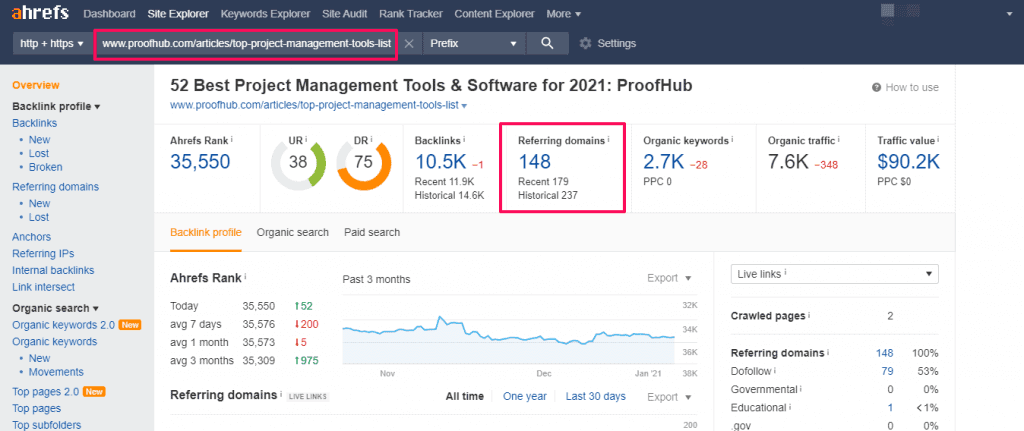
Backlinks are votes of confidence from other websites. Using a tool like Semrush or Ahrefs, pull a report of all the domains that link to your site.
Ignore the total number. Focus on two things:
- Relevance: Are the links from sites related to your industry? A local Chamber of Commerce link is far more valuable for a plumber than a link from a random recipe blog.
- Quality: Are these legitimate websites, or do they look spammy and low-quality?
You’re not looking for perfection here. You’re looking for a baseline. If your main competitor has 50 relevant, high-quality links and you have 2, you’ve identified a significant gap you need to work on.
Check #2 (For Local Businesses): Is Your Digital Shopfront Tidy?
Your Google Business Profile (GBP) is more important than your website’s homepage if you serve a specific geographic area.
Audit your GBP for:
- Completeness: Is every single section filled out? Services, photos, hours, business description?
- Accuracy: Are the name, address, and phone number (NAP) exactly the same as those on your website?
- Activity: Do you have recent, positive reviews? Are you responding to them?
Inconsistencies in your NAP across the web erode trust with Google. A well-maintained GBP builds it.
How To Get To The Top of Google
The rules of search have changed, and you’re losing. Your competitors are ranking in AI search, and you’re becoming invisible. This is the 2025 rulebook. It’s the complete guide to the new game of Generative Engine Optimisation (GEO), with proven strategies to rank in ChatGPT, Perplexity, and Google AI.
As an Amazon Partner, when you buy through our links, we may earn a commission.
From SEO Audit to Action: How to Prioritise Without Losing Your Mind
You now have a list of findings. Do not try to fix everything at once. The goal is progress, not perfection. Use a simple Effort vs. Impact matrix to sort your tasks.
Draw four boxes:
- High Impact / Low Effort: Do these now. (e.g., fixing a “noindex” tag, rewriting a bad title tag).
- High Impact / High Effort: Plan these. (e.g., a significant site speed overhaul, creating a new section of content).
- Low Impact / Low Effort: Delegate or do these when you can. (e.g., fixing a few broken internal links).
- Low Impact / High Effort: Ignore these. Seriously. (e.g., chasing a perfect 100 on a speed tool when your site loads in 2 seconds).
Finally, understand that an audit is not a one-time fix. A website is a dynamic part of your business. Schedule your next Triage Audit in three months. It’s a health check-up, not a magic pill.
The goal isn’t a technically flawless website. It’s a website that works harder and more effectively to grow your business. Start with the blocked arteries, and don’t worry about the paper cuts.
Take the Next Step
Performing an audit reveals the ‘what’. The next step is figuring out the ‘how’. The high-impact, high-effort tasks—like a comprehensive content strategy or a technical overhaul—are often where professional expertise can save you months of trial and error.
If your audit has uncovered challenges that feel bigger than a quick fix, that’s normal. That’s the point where a focused digital marketing strategy comes into play. Feel free to request a quote if you’d like an expert eye on your findings. At Inkbot Design, we help businesses turn audit findings into measurable growth.
Frequently Asked Questions (FAQs)
What is an SEO audit?
An SEO audit systematically evaluates a website’s health from a search engine’s perspective. It analyses technical, on-page, and off-page factors to identify problems and opportunities for improving search visibility and performance.
How often should I do an SEO audit?
A thorough audit once every 3-6 months is sufficient for most small businesses. This allows you to track progress, adapt to algorithm changes, and catch new issues before they become significant problems.
Can I do an SEO audit myself?
You can perform a basic but effective SEO audit using free tools like Google Search Console. This guide covers the essential checks to identify the most critical, high-impact issues.
What is the most essential part of an SEO audit?
The technical audit phase is the most critical starting point. If Google cannot properly crawl and index your website, no amount of content or backlinks will help you rank.
How long does an SEO audit take?
As described in this guide, a basic triage audit can be completed in a few hours. A comprehensive, deep-dive audit by a professional can take several days or even weeks, depending on the size and complexity of the website.
What is the difference between an on-page and off-page SEO audit?
An on-page audit examines elements on your website, such as content, keywords, title tags, and site structure. An off-page audit evaluates factors external to your site, primarily your backlink profile and online reputation.
What are Core Web Vitals?
Core Web Vitals are a set of specific metrics Google uses to measure a webpage’s overall user experience. They are LCP (loading performance), INP (interactivity), and CLS (visual stability).
What is keyword cannibalisation?
Keyword cannibalisation occurs when two or more pages on your website compete for the same target keyword, effectively splitting your authority and confusing search engines, harming the ranking potential of all competing pages.
Why is mobile-friendliness so crucial for SEO?
Google uses “mobile-first indexing,” which means it primarily looks at the mobile version of your website to determine its rankings. A poor mobile experience directly hurts your visibility in search results.
What is a ‘404 error’?
A 404 error is a standard HTTP status code indicating that the server could not find the requested page. This often happens when a page has been moved or deleted, creating a “broken link” and a bad user experience.


